Importing from Excel
Bring students and guardians, staff, and old fee dues across from your old software or registers in one Excel file. It checks first, then writes — and can be undone.
For:Owner & adminOffice & admissions
Where
boornoo.com/dashboard/settings?tab=data-import
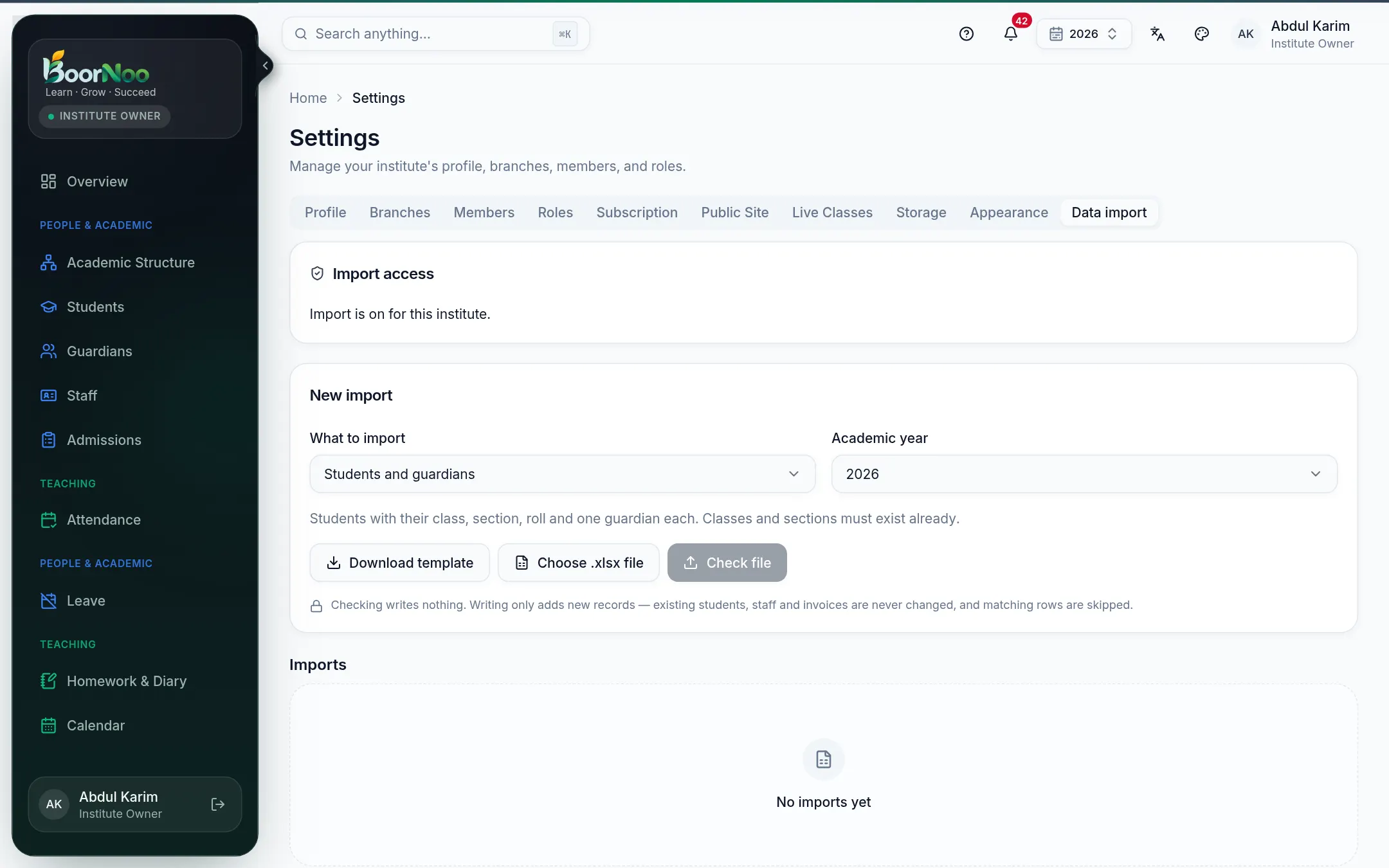
Point by point
Tap a number to see what it is.Point at a number, or scroll the list.
Step by step
- 1Choose What to import: Students and guardians, Staff and teachers or Opening fee dues. For students, choose the academic year too.
- 2Download template and fill it in. Dates as DD/MM/YYYY, phones as Bangladeshi mobile numbers.
- 3Choose .xlsx file, then Check file. Nothing is written at this step.
- 4Read the result: how many rows To add, how many Problems, how many Already exist. If there are problems, Download result — each row says what's wrong. Fix the file and upload again.
- 5When it's clean, press Add … record(s). With a big file you can leave the page — it keeps going.
- 6Press Send invitations to give staff or guardians their sign-in.
Still stuck? Ask your institute's admin, or the BoorNoo team.