Guide for resellers
As a reseller you bring new institutes to BoorNoo and earn commission on what they pay. Signing in shows one page — your link, your institutes and your earnings.
For:Reseller
Getting your account
- 1The BoorNoo team adds you as a reseller, with your details and agreement.
- 2You get an invitation email. Open the link and choose your password.
- 3From then on, sign in as usual.
Your dashboard
boornoo.com/dashboard
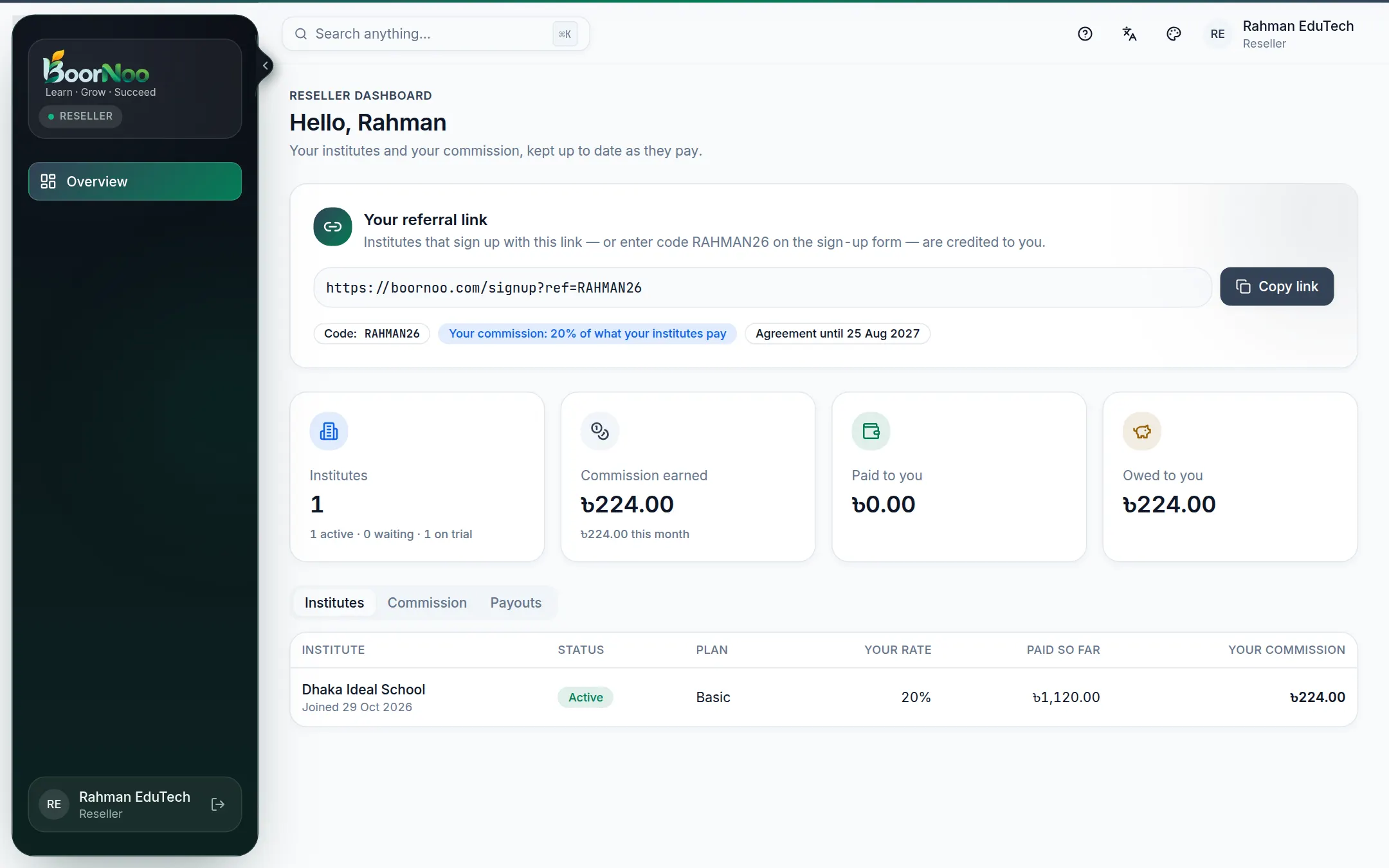
Point by point
Tap a number to see what it is.Point at a number, or scroll the list.
How commission works
- Institutes that sign up with your link or code are credited to you. They start once the platform approves them.
- When an institute pays BoorNoo, a percentage of that payment is your commission — when the money comes in, not when the bill is made.
- The rate can differ per institute; otherwise your own rate applies.
- If a payment is cancelled, its commission is taken back too.
- When BoorNoo pays you, it shows under Payouts.
I can't sign in.
Your account may be paused (frozen) or your agreement may have ended. Contact the BoorNoo team.
What happens when my agreement ends?
New sign-ups through your link stop, but commission on your existing institutes continues. Your dashboard warns you before it ends.
Still stuck? Ask your institute's admin, or the BoorNoo team.